See what needs checking before work goes out.
Mystri Audit helps CA firms check client books, find GST differences and prepare audits for review. Your firm decides what gets sent or posted.
See a sample approvalPurchase entry
Cedar Office Services
- Bill no.
- COS-1042
- Amount
- ₹8,850.00
Approval activity
- Purchase bill received
- Ready for review
Check the ledger, amount and tax.
- Approved by Anika
Not yet sent to Tally.
- Confirmed in Tally
Voucher read back by the connector.
Approval is not posting.
Follow the same fictional purchase bill through a firm’s approval and a simulated Tally check.
Bill COS-1042Cedar Office Services
Approved, waiting to send
A named person checks and approves this sample purchase entry. It has not reached Tally yet.
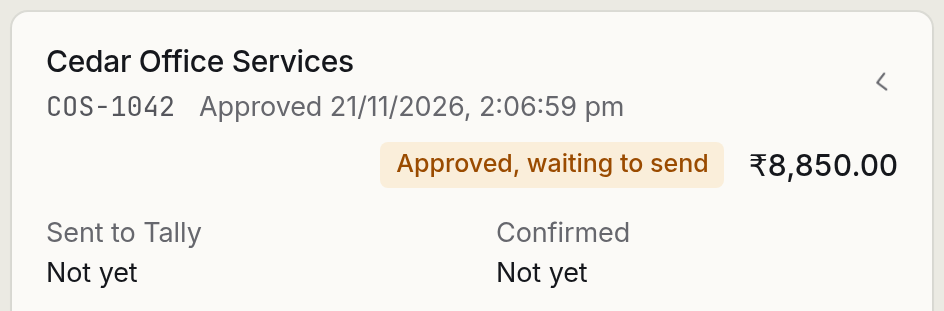
Not yet sent or confirmed
Confirmed in Tally
After sending, Mystri Connector checks that the voucher is in Tally. The example shows a simulated check.
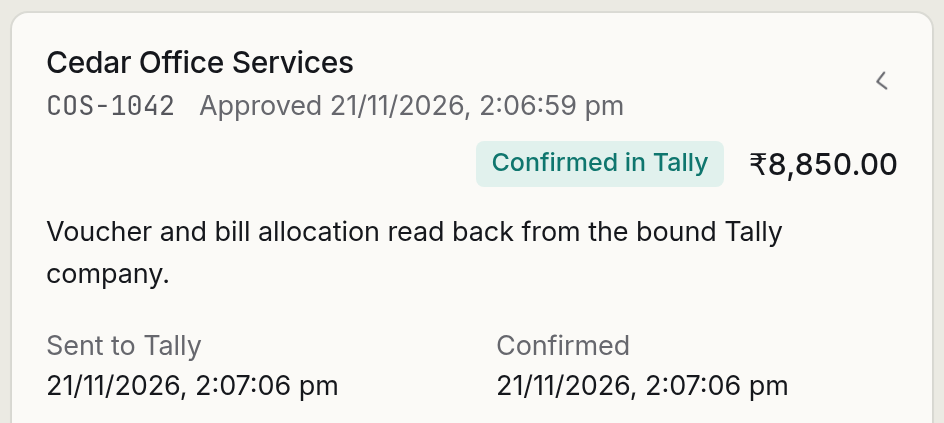
Voucher read back from Tally
Know what to check next.
Choose a task to see how your firm would handle it in Mystri Audit.
Keep using the tools you already know.
- Tally
- Run Mystri Connector on your firm's Windows computer and link it to Mystri Audit. Read the Tally books and post entries that Mystri Audit supports after approval.
- Zoho Books
- Connect the client's Zoho Books account to read its books. Approve the entries Mystri Audit supports before posting them to Zoho Books.
- WhatsApp and email
- Once set up, clients can send bills by WhatsApp or email. Check them in Mail room and file them under the right client.
Workflow guide
What you need and how to get started with each kind of work.
BookkeepingRecord bills and other entries.
Record an entry with or without a bill. Check accounts in Ledgers and keep your asset register in Fixed assets.
Before you start
The client, financial year, month and entry details. Connect the client's Tally or Zoho Books account if you want to post entries there.
Steps
- Choose the client, year and month in Bookkeeping.
- Upload a bill, use one from Mail room, or add an entry without a bill.
- Check the bill or other record, the ledger, the amounts and the tax.
- Have a named person approve a supported entry before posting it. Check that it reached the books.
ComplianceMatch purchases, check returns and draft replies to notices.
Compare purchases with GSTR-2B, check returns and draft replies to notices. Portal practice is a simulation. It does not file anything.
Before you start
The client and period. For GST matching, bring the purchase records and GSTR-2B. For other checks, bring the returns or notice.
Steps
- Choose the client and period.
- In GST reconciliation, upload the GSTR-2B JSON file and compare it with purchases. Where a read-only GST provider is configured, you can instead read GSTR-2B with the client's one-time password (OTP).
- Use Input tax credit to see what holds up credit each month. Check differences by supplier in Suppliers.
- Use Return checks, Notices or Investigations for other checks. Ask the reviewer to check the records and any draft.
AuditKeep audit records, findings and reviews together.
Keep the audit file in one place. Record what you checked, what you found and who reviewed it.
Before you start
The client, the period, what the audit covers, the records and a named reviewer.
Steps
- Set up the audit for the client and period.
- Collect the records and ask for anything missing.
- Run the checks and record what you found.
- Send the audit to its named reviewer. Follow up on their comments.
AssignmentsSee who is doing each job and when it's due.
Track returns, tax payments, bookkeeping reviews and audits.
Before you start
The client, job, due date and the names of the people who will prepare and review it.
Steps
- Create an assignment for the client.
- Set its due date and name the preparer and reviewer.
- Use the list or calendar to see what still needs doing.
- Send the work to the reviewer when it's ready.
DocumentsAsk for records and follow up.
Ask clients for records. Use Reminders to follow up and Sent messages to check what happened to each message.
Before you start
A client, a list of records, the client's contact details and a way to send the message set up in Mystri Audit.
Steps
- Create a request for the missing records.
- Check who will get the message and what it says. Have a named person approve it before sending.
- Check what arrived. Use Reminders for anything still missing.
- Approve the reminders and check the result in Sent messages.
Test mode sends nothing. The messaging service can accept a message before the client receives or reads it.
CalendarSee what's due and what's late.
See upcoming and overdue work for your clients in one list.
Before you start
Client work with a due date.
Steps
- Open Calendar.
- Find the client and due date.
- Open the assignment or create one for that due date.
Review and ActivityApprove work and see who did what.
Review lists work that needs approval. Activity shows who acted and when.
Before you start
Work ready to check and a person who has permission to review it.
Steps
- Open Review and choose an item.
- Read the draft and check the records behind it.
- Check what will happen, then approve or reject the item.
- Open Activity to see who did what.
What your firm still does
Does Mystri Audit file GST returns or pay tax?
Your firm files returns and pays tax. Mystri Audit does not file or change anything on the GST portal. Portal practice is a simulation.
Does it carry out the statutory audit?
Your auditor carries out the statutory audit, gives the opinion and signs the report. Mystri Audit keeps the records, checks and review together.
Who decides whether to claim input tax credit?
Your firm decides whether to claim input tax credit. Mystri Audit shows what holds it up.
Does Mystri Audit contact my clients’ suppliers?
Your client contacts their suppliers. Mystri Audit drafts the request but does not send it to the supplier.
Who approves entries and messages?
A named person approves entries for posting and authorises messages, including batches of reminders.
Can I post reverse-charge bills through Tally?
You cannot post reverse-charge bills through the regular posting process. Mystri Audit does not fill every statutory field in Tally.
Request access
Tell us a little about your firm and what you want to try.